How To Debloat Your Xiaomi Device Without Root 1/5/2022Comments
If you own a Xiaomi device, you've probably grown tired of the slowness, bloatware, advertisements, and other unnecessary services that come with it. Isn't it fascinating that we have a solution to this problem, and it doesn't need rooting your device? If that's the case, just keep reading till the end.

Introduction#
If you own a Xiaomi device, you've probably grown tired of the slowness, bloatware, advertisements, and other unnecessary services that come with it. Isn't it fascinating that we have a solution to this problem, and it doesn't need rooting your device? If that's the case, just keep reading till the end.
Even if you aren't using them, apps like Facebook, Xiaomi data collection apps, and Google Services might consume ram in the background. Uninstalling these unneeded apps can save up storage space and help your phone run faster. There are several methods for debloating your device. However, the most efficient is using the Xiaomi ADB/Fastboot Tools technique shared in this post.
STEPS:#
- Turn On USB Debugging:
1. Go into the Settings > About phone > All specs > And repeatedly tap on MIUI version to enable Developer Options.
2. After that, Go to Settings > Additional settings > Developer settings > scroll down and enable USB debugging and USB debugging (Security settings).
- Download Xiaomi ADB/Fastboot Tools:
1. You can download the ADB/Fastboot Tools, by Szaki, from HERE
NOTE: JAVA is needed to be installed on your system to run this application.
- Connect Your Smartphone Via USB Cable:
1. Open ADB/Fastboot Tools, Allow USB Debugging on your smart phone.
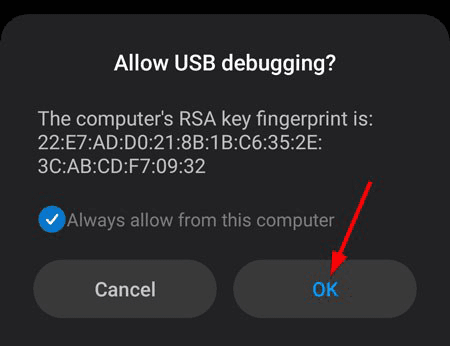
- Now your device will be recognized
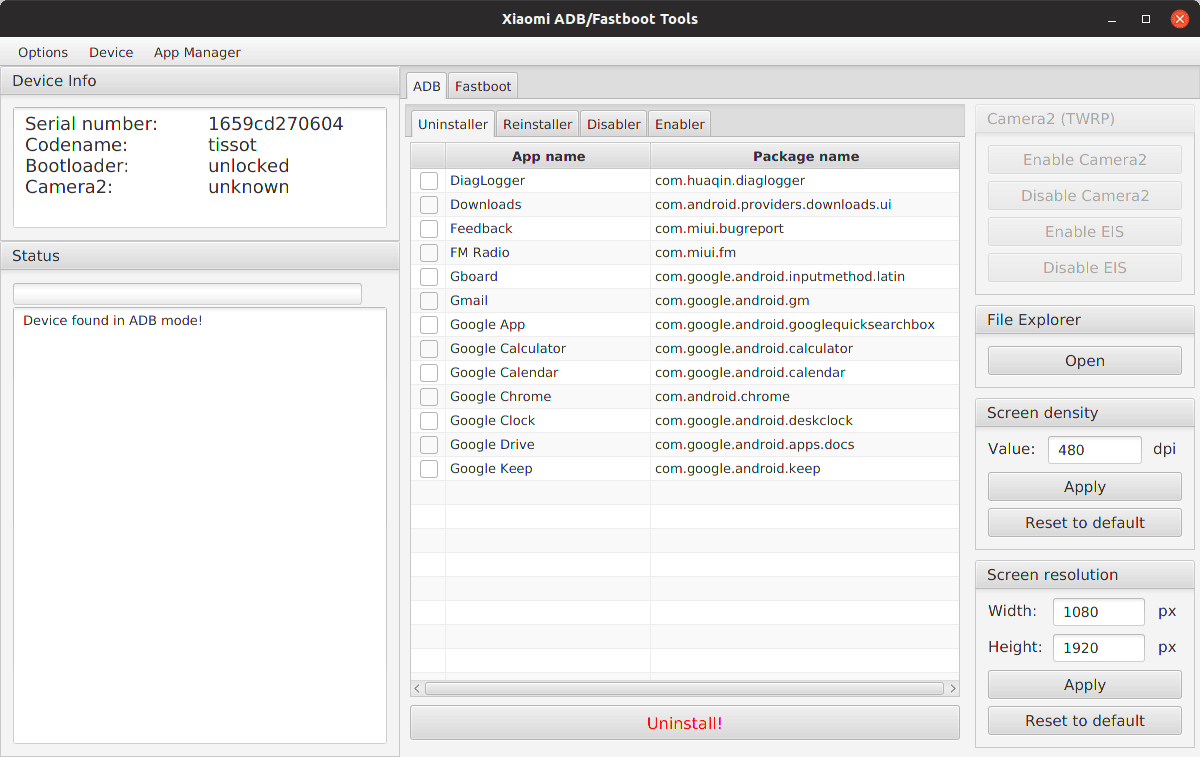
- Now Select the Application You want to uninstall, and Click Uninstall.
- Done...Now Enjoy.
NOTE: Uninstalling some apps may break some features so proceed with caution. Down Below We have provided a list of safely removable apps.
List Of Safely Removable Apps:#
Xiaomi:#
- com.miui.analytics - Mi Analytics (Spyware?)
- com.xiaomi.mipicks - GetApps - app store like Google Play from Xiaomi. The most annoying one, periodically shows advertisement.
- com.miui.msa.global - MIUI Ad Services - also responsible for showing ads.
- com.miui.cloudservice & com.miui.cloudservice.sysbase & com.miui.newmidrive - Mi Cloud
- com.miui.cloudbackup - Mi Cloud Backup
- com.miui.backup - MIUI Backup
- com.xiaomi.glgm - Games
- com.xiaomi.payment & com.mipay.wallet.in Mi Credit
- com.tencent.soter.soterserver - Authorize payments in WeChat and other Chinese services, useless if you don’t live in China.
- cn.wps.xiaomi.abroad.lite - Mi DocViewer(Powered by WPS Office)
- com.miui.videoplayer - Mi Video
- com.miui.player - Mi Music
- com.mi.globalbrowser - Mi Browser
- com.xiaomi.midrop - Mi ShareMe
- com.miui.yellowpage - Mi YellowPages. Some kind of caller id app.
- com.miui.galleryMIUI - Gallery - if you use another gallery app WARNING: @nihalanand697 reports disabling it isn’t safe. But I had no problems after uninstalling it.
- com.miui.android.fashiongallery - Wallpaper Carousel
- com.miui.bugreport & com.miui.miservice - Mi Bug Report - if you not using this feature
- com.miui.weather2 - MIUI Weather. I prefer another weather app.
- com.miui.hybrid & com.miui.hybrid.accessory - Quick apps.
- com.miui.global.packageinstaller - MIUI package installer. Without it Play Store app will be used. It shows ads, but I like that you can manage app permissions before starting it.
- com.xiaomi.joyose?? -Some junk